
CLIENT BOOKING & TRIP MANAGEMENT
Book and Manage Your Rides
Book your Summit Premier Limo rides, manage upcoming trips and receive driver updates with our passenger app. Sign in with your passenger account to get started.


A Better Way to Book
The free passenger app keeps pricing, reservations, trip updates and payment tools in one convenient place.
Getting Started
- 1. Request passenger account access from Summit Premier Limo
- 2. Follow the account setup instructions sent to your email
- 3. Download Book Rides Passenger for iPhone or Android
- 4. Sign in to request reservations and manage your rides
Everything You Need in One App
Manage the complete reservation experience without calling or waiting for an email.
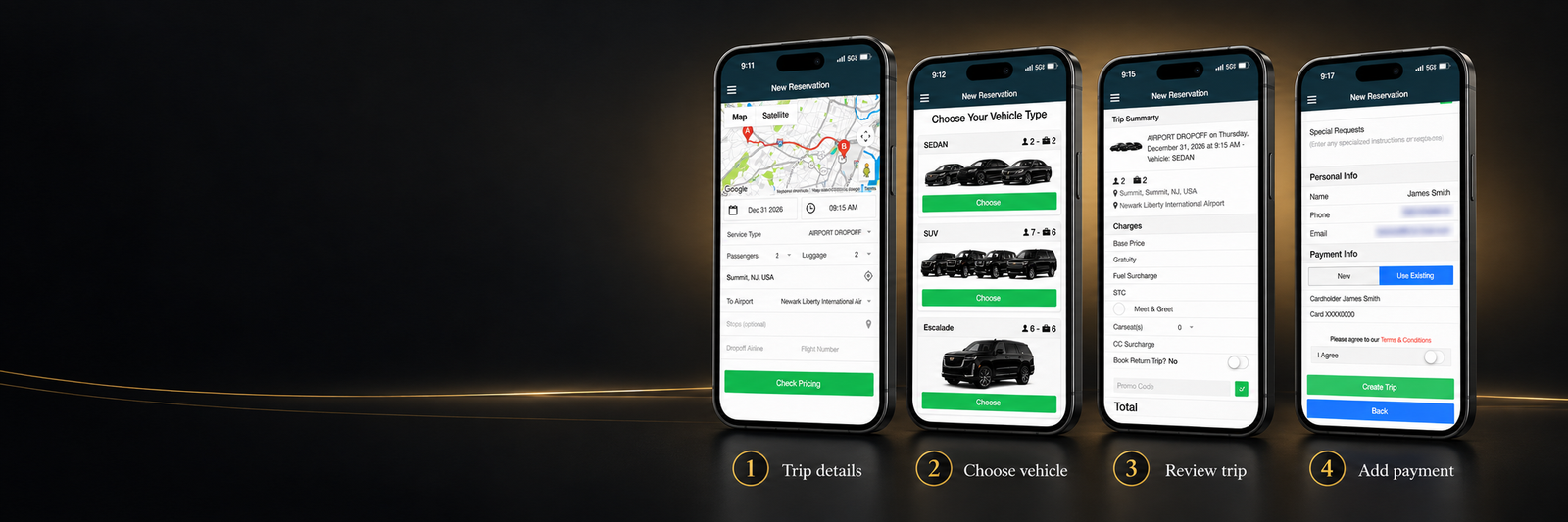
Reservations and Pricing
- Create, confirm or cancel reservations
- Submit quote requests and check trip pricing
- Apply promotional codes
- Request meet and greet service or car seats
Trip Updates and Payments
- Track your dispatched driver in real time
- Receive push notifications
- Pay pending balances and email receipts
- Update your profile, password and billing information
Built for Corporate Clients Too
Authorized corporate clients can coordinate transportation for employees, guests and executives from the same passenger app.
Corporate Client Features
- Create and manage passengers
- Update passenger billing information
- Book reservations on behalf of passengers
Passenger App Questions
Need login access? Contact Summit Premier Limo by email or phone, or reserve a trip online. When your passenger account is created, login instructions are sent to the email address used for your reservation.
How do I receive passenger app login access?
You can request access by emailing us or calling (908) 830-5466. You can also reserve a trip online. When your passenger account is created, login instructions are sent to the email address used for the booking.
I forgot my password. How do I regain access?
Call (908) 830-5466 or email info@summitpremierlimo.com. We can send secure password-reset access to the email address connected to your account.
Is the passenger app free?
Yes. The Summit Premier Limo passenger app is free to download for iPhone and Android devices.
Can I check pricing before booking?
Yes. Enter your trip details to view available vehicle pricing or submit a quote request.
Can I track my driver?
Yes. After your driver is dispatched, the app can send a notification and display the vehicle location in real time.
Can I manage or cancel a reservation in the app?
Yes. Depending on the reservation status, you can create, confirm or cancel a reservation in the app. Contact us if you need help with a change.
Can corporate clients book for other passengers?
Yes. Authorized corporate clients can create and manage passengers, update passenger billing information and book reservations on their behalf.
Which phones support the passenger app?
The passenger app is available for iPhone through the App Store and for Android phones through Google Play. Use the download buttons on this page to open the correct store.
Download the App and Ride with Confidence
Book your next Summit Premier Limo reservation through Book Rides Passenger on your iPhone or Android device.